
Grand Theft Auto VI - Keyboard to Controller
Play GTA 6 on PS5 with keyboard and mouse, for walking, running and shooting. WASD moves, the mouse looks and aims, left click shoots, Shift runs and Space jumps. Import all three and give each a hotkey (Profiles, Set hotkey) to switch between on foot, driving and flying.
From the author
Play GTA 6 on your PS5 with keyboard and mouse. This config is for walking, running and shooting.
How to set it up
In OmniControl, open Remote Play and connect to your PS5. The first time, it asks for a code your PS5 shows.
Import all three GTA 6 configs: On Foot, Driving and Flying.
Open Profiles and give each one a hotkey. Then one key switches between walking, driving and flying.
Turn on Drive a Controller.
In GTA 6, open Settings, then Controller, and copy the settings in the pictures below.
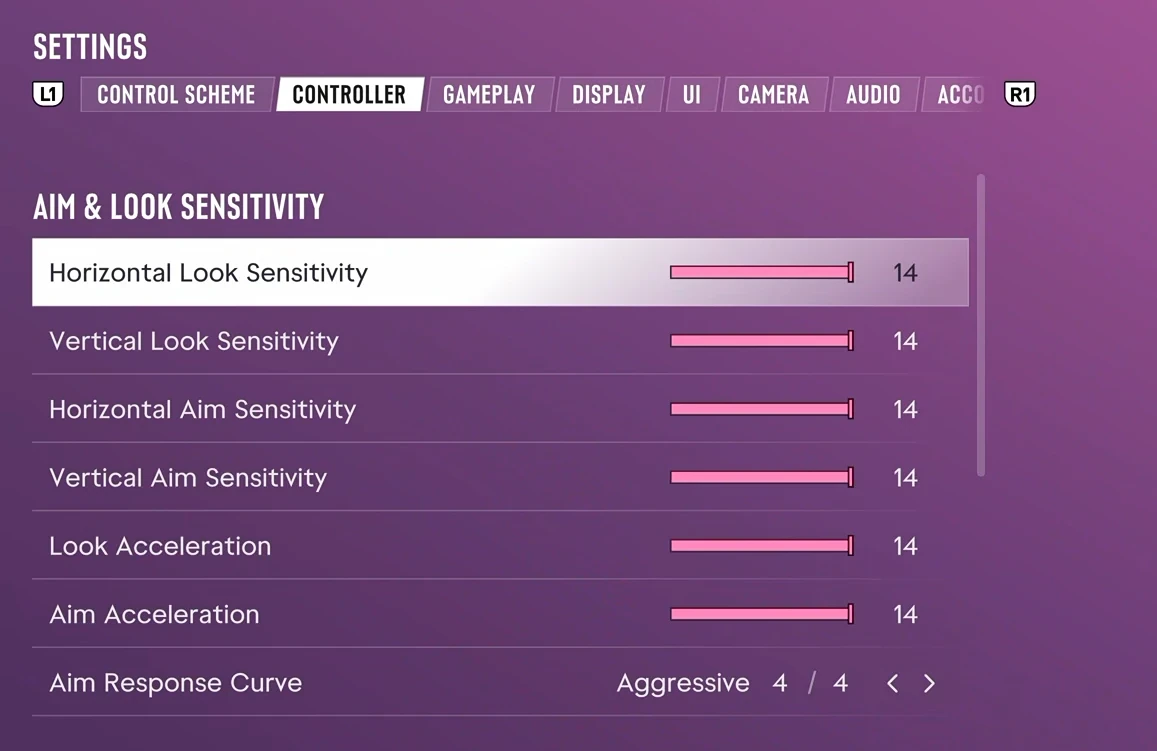
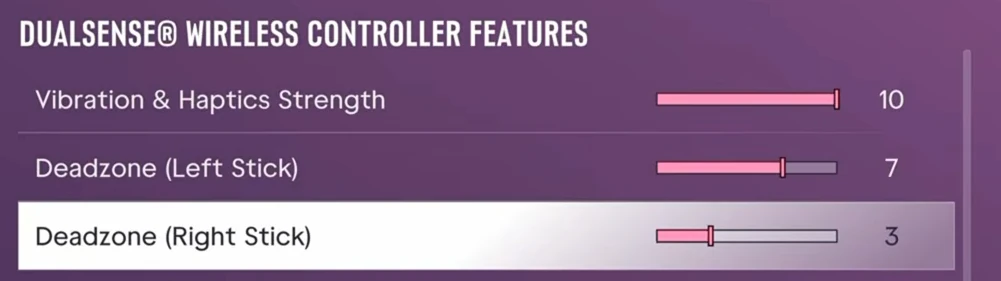
Play. Press your hotkeys to switch config when you get in or out of a vehicle.
Good to know
Mouse too fast or too slow? Change Sensitivity on the Drive a Controller page.
You can change any key on the Drive a Controller page.
These configs only use your keyboard and mouse. A controller you plug in works as normal.
Plug your PS5 into your router with a cable if you can. The game feels more responsive.
Needs OmniControl Pro or the free trial.
What this pack changes
Output
Via Emulation (Pro)
- Emulation: virtual controller target
Import it
Have the app installed? The Open in OmniControl button at the top jumps straight to the import preview. Otherwise:
Open OmniControl
Go to Profiles (or Game Packs).
Click Import
Paste OC-GRANDX6P into the share-code box.
Preview what it changes
Then create a profile from it.
Importing only ever creates a new profile. Your existing profiles are never touched.