
Controller setup
This guide shows you how to connect a controller to OmniControl over USB or Bluetooth and confirm it is detected. Once your pad is recognized, OmniControl reads it as a live 3D model and unlocks the rest of the platform.
Overview
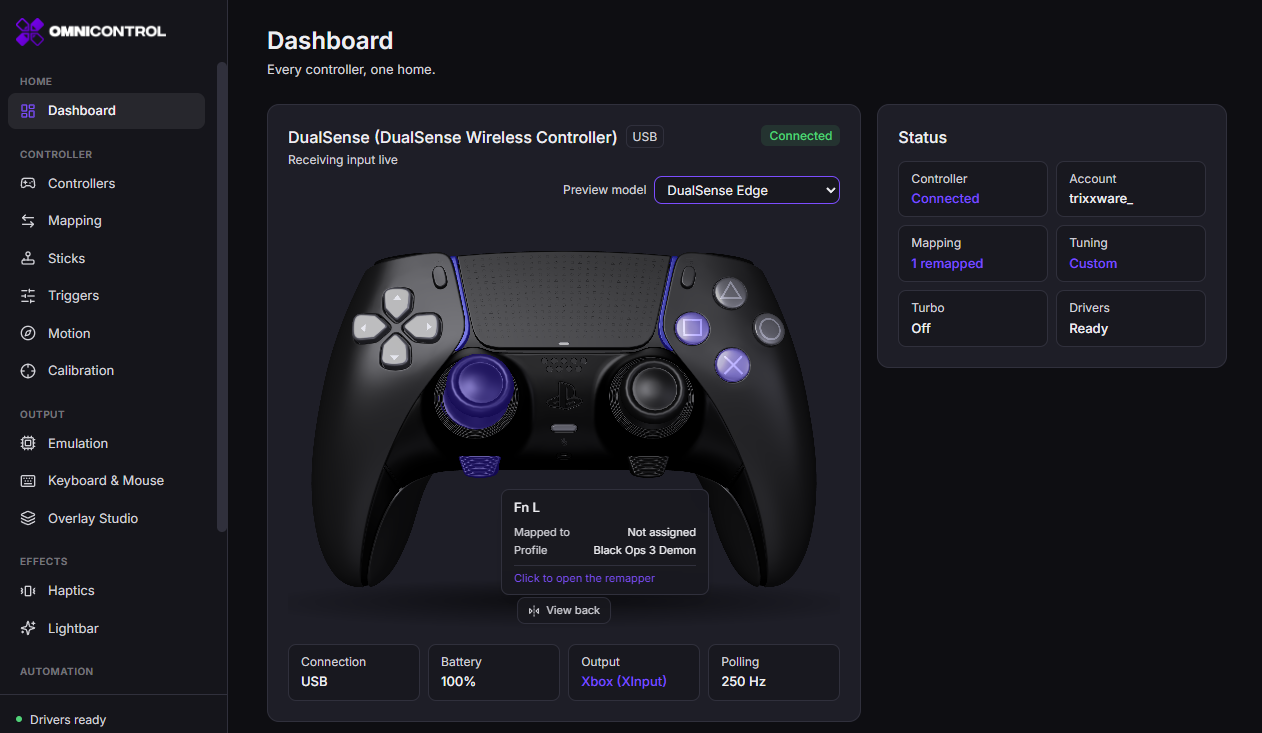
OmniControl is the controller layer for Windows. Before you remap a button, tune a stick, or emulate a virtual pad, the app has to see your controller. Connecting is the first step, and it takes seconds. OmniControl detects supported pads automatically over USB or Bluetooth and renders each one as a true-to-life 3D model that lights up every button, stick, and trigger as you use it.
The Live Viewer that appears once a controller connects is free. It shows battery level, connection type, and device info, and it includes a built-in controller test, a motion visualiser, and full diagnostics. It is both your setup confirmation and your everyday check that a pad is behaving.
Supported controllers:
- Sony: DualSense, DualSense Edge, DualShock 4, DualShock 3
- Microsoft: Xbox Series X and S, Xbox One, Xbox 360, Xbox Elite Series 2
- Nintendo: Switch Pro Controller
- Generic HID gamepads
How it works
OmniControl reads controllers at the HID level, the same layer Windows uses to talk to a physical pad. When you plug in over USB or pair over Bluetooth, Windows registers the device and OmniControl picks it up, identifies the model, and maps it to the matching 3D viewer.
USB and Bluetooth differ in what they carry. USB is the complete connection and transports the full feature set. Bluetooth is cable-free and handles standard remapping and emulation, but some DualSense hardware features do not travel over it.
Getting started
Choose a connection
USB gives you every feature, including the DualSense extras. Bluetooth is cable-free and covers remapping and emulation. Pick USB if you want the full toolkit.Connect over USB
Plug the controller in with a data-capable cable, not a charge-only one. A charge-only cable powers the pad but carries no data, so OmniControl will not see it.Or pair over Bluetooth
Put the pad in pairing mode. On DualSense and DualShock 4, hold the PS button and the Create or Share button until the light bar flashes. Open Windows Settings, add a Bluetooth device, and select the controller.Wait for detection
OmniControl names the pad and shows its live 3D model. Detection is automatic; you do not need to add the device inside the app.Test it
Press a few buttons and move both sticks. The 3D model mirrors your input in real time. That confirms OmniControl is reading the controller correctly.
Common use cases
- Verifying a new or secondhand controller works before you rely on it, using the built-in controller test and diagnostics.
- Checking for stick drift or a dead trigger by watching the live 3D model and running a calibration pass.
- Connecting a DualSense over USB so you can reach its adaptive triggers, gyro, touchpad, and lightbar.
- Confirming battery level and connection type at a glance before a session.
- Setting up a pad as the input for remapping, stick and trigger tuning, or emulation.
Best practices
Use a known-good data cable for USB. Cable faults are the most common reason a pad powers on but never appears. For DualSense, default to USB so the adaptive triggers, gyro, touchpad, and lightbar are all available. Keep one pad connected at a time while you learn the app, then add more once you are comfortable. If a controller stops responding, the fastest fix is usually to reconnect the cable or re-pair over Bluetooth rather than restarting the app.
Run calibration once a pad is connected. It measures stick and trigger drift and corrects hardware behavior underneath everything else you configure, so your tuning sits on an accurate baseline.
Tips
Troubleshooting
The controller does not appear. Over USB, swap to a cable you know carries data, and try a different port. Over Bluetooth, remove the device in Windows Settings and pair it again. Some pads need to be woken with a button press before Windows lists them.
The model appears but does not respond. Reconnect the cable or re-pair. If a single control misbehaves, run calibration and check the reading in the Live Viewer's controller test.
DualSense features are missing. Adaptive triggers, gyro, the touchpad, and the lightbar require USB. If you are on Bluetooth, connect a data cable.
For anything the above does not cover, see Troubleshooting.
FAQ
Do I need an account to connect a controller?
No. Detecting a pad, the Live Viewer, diagnostics, and calibration are all free and need no account.
Which is better, USB or Bluetooth?
USB carries the full feature set, including every DualSense extra, and is the more reliable connection. Bluetooth is cable-free and fine for standard remapping and emulation. Choose USB when you want everything.
Why does my DualSense lose its adaptive triggers over Bluetooth?
Those hardware features - adaptive triggers, gyro, touchpad, and lightbar - only travel over USB. Bluetooth does not carry them. Connect a data cable to restore them.
My cable is plugged in but nothing shows up. Why?
The most likely cause is a charge-only cable, which delivers power but no data. Swap to a data-capable cable and try another USB port.
Can I use more than one controller at once?
Yes. OmniControl detects supported pads as you connect them and gives each its own live 3D model. To assign a pad to a game, set up profiles once your controllers are connected.